
Paddock
The on/off switch for your local Ollama server.
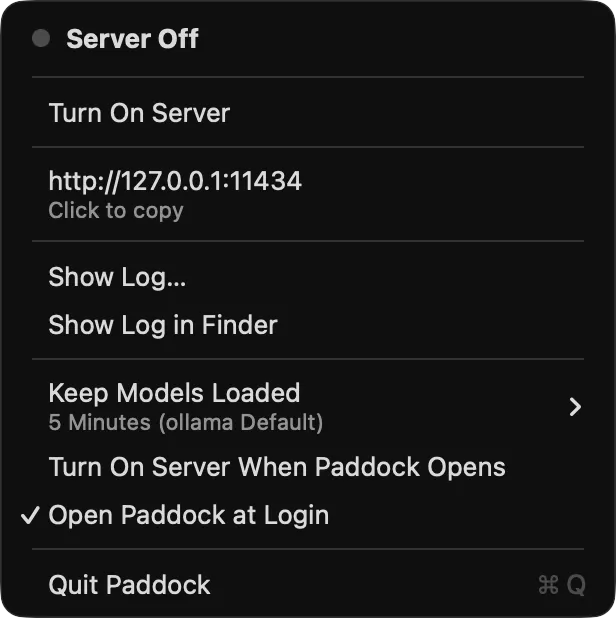
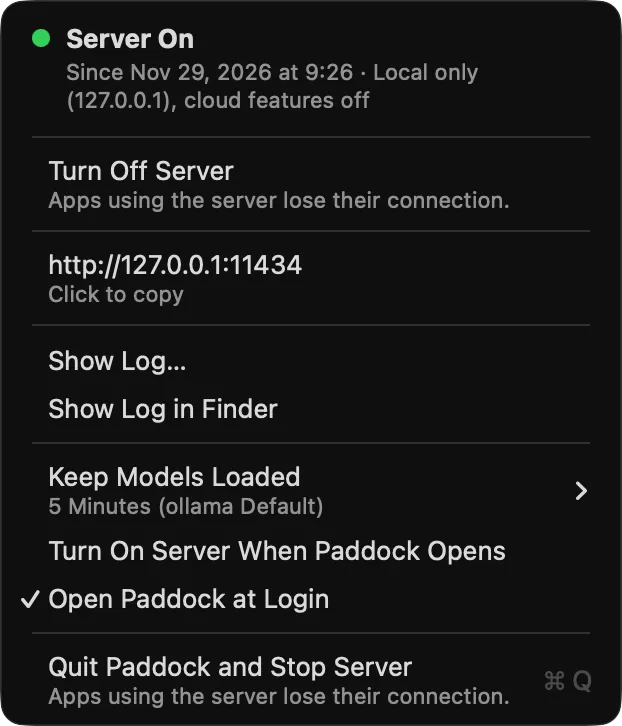
The icon shows the state.
Illustration
What it does.
On and off, local-only
Nothing outside this Mac can connect, and Ollama’s cloud features are off.
State at a glance
A fence icon with a mark beside it: off, on, started elsewhere, starting, or no Ollama.
Stopping asks first
Paddock only ever stops a process named ollama, and asks before stopping one it did not start.
The address and the log
Copy the server address with a click and read the last lines of the log.
Quit stops what it started
A server started outside Paddock is left running.
A few settings
How long models stay in memory, turn on at open, open at login.
Questions.
What does Paddock do?
It runs the one shared Ollama server on your Mac: it turns it on and off, shows at a glance whether it is running and who started it, and always starts it local-only with Ollama’s cloud features off.
Does Paddock include Ollama?
No. Ollama is a separate program that you install yourself, for example with Homebrew. Paddock starts and stops it.
Does Paddock send any data?
No. It only opens connections to 127.0.0.1:11434, to see whether something is listening there, and sends nothing over them. It has no analytics and no update check.
What happens when I quit Paddock?
The server it started stops with it, and the menu says so. A server started outside Paddock is left running.
Which Macs does it run on?
Macs with Apple silicon, macOS 26.
Details, installation and privacy of Paddock
Details
- Works on
- Mac with Apple silicon, macOS 26
- Needs
- Ollama, installed separately
- Latest release
- 0.1.0 · 12 Oct 2026
- Licence
- MIT
Install
Each release is a .dmg.
- Download Paddock-x.y.z.dmg and its .sha256 file from the latest release.
- Open the dmg and drag Paddock onto Applications.
- Install Ollama separately, for example with Homebrew. Paddock starts and stops it but does not include it.
Privacy
Paddock collects no data and sends nothing anywhere. It opens connections to 127.0.0.1:11434 only, to see whether something is listening there, and has no analytics and no update check.